





 HVAC
HVAC

Flat-rate pricing systems now dominate among the HVAC contractors we support at ServiceTitan. To help, we offer a free Google Sheet template that HVAC businesses can use to build a flat-rate pricebook.
In the next section, we explain how to customize and use it as your own.
Before you dive in, however, know that using a flat-rate pricing template also presents significant limitations for some business owners.
HVAC contractors who rely on a pricing template still face many of the challenges involved in the pricebook management, estimating, and invoicing processes.
Below, we’ll take a closer look at these limitations, and explain how contractors are using field service management software (FSM) with built-in pricebook functionality to solve them. Specifically, we’ll explain how ServiceTitan helps trade service businesses:
Create, customize, and manage HVAC flat-rate pricebooks
Efficiently generate accurate estimates
Seamlessly produce invoices and facilitate payment
How to Use Our HVAC Flat-Rate Pricing Template
Click here to make a copy of our flat-rate pricing template for HVAC contractors.
This free template features two easy-to-use pages:
1. Flat-Rate Pricing Calculator


The first page offers a calculator that allows you to quickly arrive at the right flat-rate price for each of the HVAC services your shop provides.
You can compute job costs, and factor in your target gross margin, and all of the relevant markups and discounts to come up with three levels of flat rate pricing:
Standard
Membership
After Hours
2. HVAC Flat-Rate Schedule


On the second sheet, you can list all of the HVAC services and equipment you offer. For example: boilers, air conditioning units, condensers, heat pumps, capacitors, custom HVAC repairs, duct cleaning, tune-ups, fuel oil services, furnaces, and air handlers.
During the estimating and invoicing process, employees in the field and at the office can use a paper or digital version of the template to complete their work.
Again, you can check out the master template here.
To use the template, click the "Make a Copy" button.
From there, you can customize the template according to your needs. Using the calculator from Page 1, you can then begin creating your own flat-rate pricing book.
Since Google Sheets is hosted in the cloud, new updates are automatically accessible via mobile device or desktop in real-time.
Note: Visit our HVAC templates hub to access related templates, such as our HVAC estimate template, HVAC invoice template, HVAC service agreement template, HVAC proposal template, and HVAC bid template.
The Limitations of Relying on a Flat-Rate Pricing Template
While an HVAC pricebook template can be a decent organizational tool, a template comes with limitations:
1. Manual & Error-Prone Workflows
HVAC contractors will still need to manually transfer pricing from their template to estimates; from estimates to work orders; and from work orders to invoices. Copying data between PDFs, spreadsheets, and emails is time-consuming and leaves plenty of room for costly mistakes. A small error can delay jobs, hurt credibility, or lead to disputes with customers.
2. Lack of Real-Time Updates Leads to Inaccurately Priced Estimates
A template is just a digital piece of paper—it doesn’t update automatically. Prices change, but your pricing template won’t. Without a live connection to your pricebook, you risk using outdated numbers that shrink profit margins or cause inconsistencies across projects.
3. Lack of Product and Service Media (Photos, Videos, etc.)
Spreadsheet templates make it difficult to manage visual elements of a pricebook such as photos or videos of products and services. Estimates are therefore less visual and compelling to prospective customers, or take longer to create and make visual.
4. Time Drain & Missed Opportunities
Using templates wastes opportunities. The time that techs take to put together estimates is time they’re not spending on other jobs. Similarly, time that managers and CSRs spend searching through or updating a static pricebook is time they’re not spending on winning new business and delivering optimal customer service.
Why Settle for Outdated Templates? ServiceTitan Solves These Pain Points
PDF templates (or programs like Microsoft Word, Microsoft Excel, Google Docs, or Google Sheets) may work sufficiently for small businesses or individual contractors. But in our experience, HVAC companies reach a point where manual workflows around pricing and estimating—crucial tasks for the business—become frustrating and limit business growth.
In the next section, we’ll explain how ServiceTitan’s HVAC contractor software solves these issues, integrating the core business functions of pricebook management and estimate and invoice creation into a seamless system that drives efficiency and revenue growth for residential and commercial HVAC operations.
How ServiceTitan’s Integrated Pricebook Helps HVAC Contractors Deliver Fast, Accurate Estimates and Invoices

To give HVAC contractors the dependable foundation they need, ServiceTitan's HVAC contractor software includes an easy-to-use, built-in pricebook fully integrated into every part of the platform—so estimates are priced for profit, job costing and reporting stay accurate, and invoices and accounting always reflect your latest pricing.
Our flat-rate pricing software supports HVAC, electrical, plumbing, and other trades with consistent, reliable pricing tools—whether teams are working in the office or out in the field. With our software, pricebook management isn’t just easier, it actually becomes a tool to help contractors drive growth.
Here’s how it works.
Flexible, Customizable Pricebook Setup
ServiceTitan offers three ways of building your HVAC pricebook:
Upload a pricebook that your business is using, so you don’t need to start from scratch if you already work with one.
Build your pricebook from scratch by adding each item or product one by one (useful if you’re a small business).
Use ServiceTitan’s Pricebook Pro add-on product, which comes with a wide range of pre-built, flat-rate HVAC services to give you a head start on building out your pricebook.
Anyone on your team can access the pricebook live on a desktop, laptop, or mobile device.


ServiceTitan pricebooks are highly customizable, so you can easily create and organize your pricebook to suit the size and complexity of your business.
For example:
Organize by business division (residential and commercial).
Organize by industry or service type (such as plumbing or electrical), and set specific access permissions.
Organize by material type (e.g., refrigeration materials, boiler materials, etc.).
All pricebooks offer clear visual organization with easy search options (product code, part number, model number, name, or category).
Bulk Editing & Automation Features Keep Prices Up to Date


Managing price fluctuations presents an ongoing challenge for contractors in the HVAC industry — particularly when price changes need to be reflected in a high volume of materials, services, or jobs.
Instead of juggling spreadsheets, formulas, and manually updating price lists individually, ServiceTitan offers three solutions:
Bulk Editing: Apply edits and markups on multiple services, materials, or equipment across your entire pricebook at once, or select groups or categories.
Individual Item Editing: Edit individual services or pricebook items manually, including as much or as little detail as you want.
Dynamic Pricing Automations: Set up rules to dynamically automate pricing updates when material costs and labor rates change. You can also automatically apply “after-hours” price increases when doing work outside of normal business hours.
HVAC contractors can make quick adjustments to individual services for specific jobs or apply global edits—like discounts or labor rate changes—across their entire pricebook. Because updates sync in real time across the platform, all estimates, proposals, invoices, and accounting automatically reflect the most current pricing on every device.
HVAC Product Catalogs Available in Real-Time


If you work with a ServiceTitan-integrated supplier, Pricebook Connect keeps your material and equipment pricing automatically up to date with supplier catalogs linked directly to your HVAC pricebook.
Pricebook Connect:
Applies pricing updates automatically or lets you set up alerts for price, description, and image changes.
Highlights product upgrades and recommendations that perform well for your HVAC services, helping protect profit margins while uncovering new upsell opportunities.
Using Pricebook Connect means your proposals reflect the actual materials that will be used (rather than generic placeholders).
The #1 newsletter for the trades.
Drive Revenue with Pricebook Pro
ServiceTitan offers additional functionality with Pricebook Pro — a dynamic pricebook we build and maintain with the guidance from experienced industry experts.
Key benefits include:
Ready-to-use pricebooks with preset categories, services, and templates, including images, descriptions, and pricing data.
Automatic pricing and updates — enter your labor rate once and flat-rate prices automatically update.
Built-in upgrade recommendations to increase revenue per job.
Price Insights (AI-powered) — compares your prices to local market averages and shows a confidence meter for smarter bidding. Customers who use Pricebook Pro see an average 13% year-over-year revenue increase.
Build Estimates for Every Job Type & Size


ServiceTitan gives contractors flexibility to create estimates in the way that best fits their business needs—from replacing an air conditioning unit for a homeowner to larger, long-term construction jobs:
Good-Better-Best Proposals
For Home Service & Installation:
Create multiple proposal options (from scratch or customized from pre-built templates). The customer can click into each option and view further details of the service, including the material images and descriptions.
Embed a financing application in proposals so that customers can apply for financing in just a few steps, increasing the sales opportunity and customer satisfaction at the same time.
Precise Line-Item Estimates
For Projects Where All Details Are Known Upfront:
Build precise line-item estimates that list the exact services, materials, and equipment required for a job by pulling items directly from your pricebook.
Trigger purchase orders via requisitions, tie estimates directly into purchasing and invoice closeout workflows for streamlined job costing and project management.
Rough Estimates for Complex Projects
Where You Need Flexibility:
Use rough project estimates to build budgets for large-scale or long-term projects when every detail isn’t known upfront. This method is especially useful for commercial installs, construction estimating, and early-stage bids.
Instead of listing specific equipment or material costs, use summary tasks and revenue items to represent overall contract value and projected costs.
Estimate Follow-Up Features

Close More Deals:
Customers can approve estimates directly online via a secure link in estimate emails.
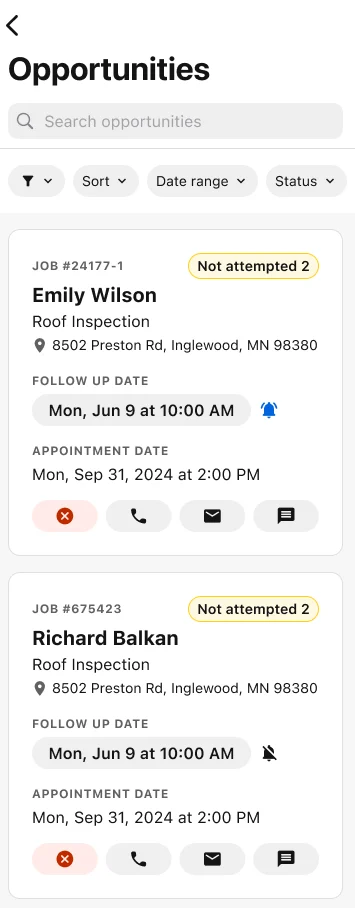
Office staff can schedule automatic reminders for unsold estimates and set up real-time alerts to notify your team when an estimate is viewed or signed.
Techs can flag unsold proposals from the field and staff can review open opportunities, call or email customers, log follow-up notes, and set reminders—all from one place.
Seamlessly Translate Estimates into Accurate Invoices

Once a customer approves an estimate, ServiceTitan helps you create invoices quickly and get paid faster with:
Automated invoice creation: ServiceTitan automatically populates the invoice so there’s no discrepancy between the estimate and the bill. Create invoices and ask customers to e-sign them on-site with a mobile device or send invoices by email with a payment link.
Convenient customer payments: Save time and bring in revenue faster by taking payments on the spot. Or, clients can pay online through our self-serve customer portal. Here, they can view their estimates, job histories, schedule appointments, view invoices, and pay their bills — without the need to call in, make requests, speak to your team, etc. — all of which further reduces the demands on your staff.
Equips Techs to Manage Pricing & Estimates in the Field

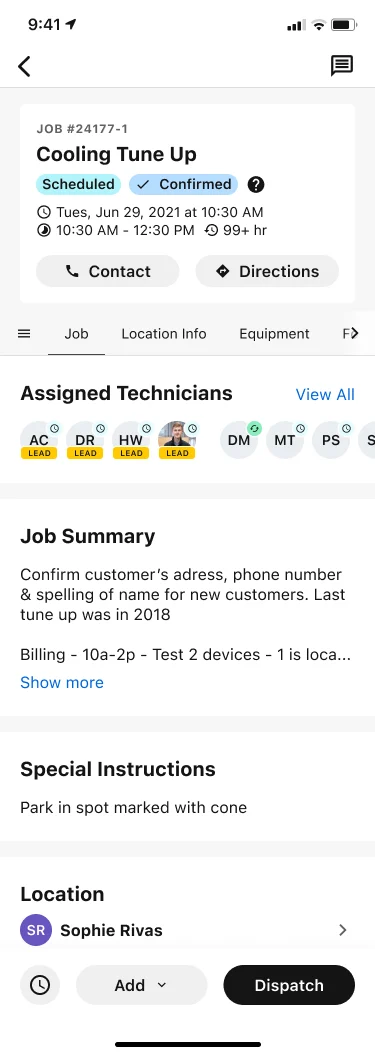
HVAC techs using our Mobile App (via Android and iOS) gain access to a wide range of functionality when performing service calls, including pricebooks and estimating features.
From their home screen dashboard, they can:
Take and upload pictures
Access pricebooks and search for specific items
Create estimates
Provide customers with Good-Better-Best presentations
Order parts
Listen to call recordings between customers and CSRs
View a customer’s job history and warranty details
Send text notifications to customers to confirm and revise arrival times or follow up
Collect signatures on work orders
Offer simple financing options to customers
Take check and credit card payments
And more

To work even more efficiently out in the field, techs can leverage Atlas, ServiceTitan’s new AI sidekick.
Atlas gives technicians instant access to:
Equipment documents, service history, replacement parts, manuals, and troubleshooting guidance—all without calling the office or flipping through old PDFs.
Calculations, diagnostic tests, and job details with a quick voice or text query.
Automated job summaries and notes so techs can spend more time fixing systems and less time typing on their phone.
Used in conjunction with Price Insights for businesses that opt for Pricebook Pro, our AI functionality empowers technicians and saves them a significant amount of time.
Ready to Streamline Your HVAC Pricebook with ServiceTitan?
ServiceTitan streamlines every step of an HVAC job, including the process of managing an easy-to-use, built-in pricebook. Our software seamlessly integrates pricebook management, estimating, and invoicing functionality to drive more effective sales processes that increase close rates, grow average ticket prices, and boost your bottom line.
To learn more about how ServiceTitan can help your HVAC business price HVAC jobs accurately and profitably, schedule a call with us today.


